01
Create a task
Open a task in one line — title, assignee, priority, status and due date — and put it into motion. Mana AI can create it by command too.
Managelify manages tasks, subtasks, assignments, priorities and Mana AI-powered actions across list, Kanban and timeline — in the same context.
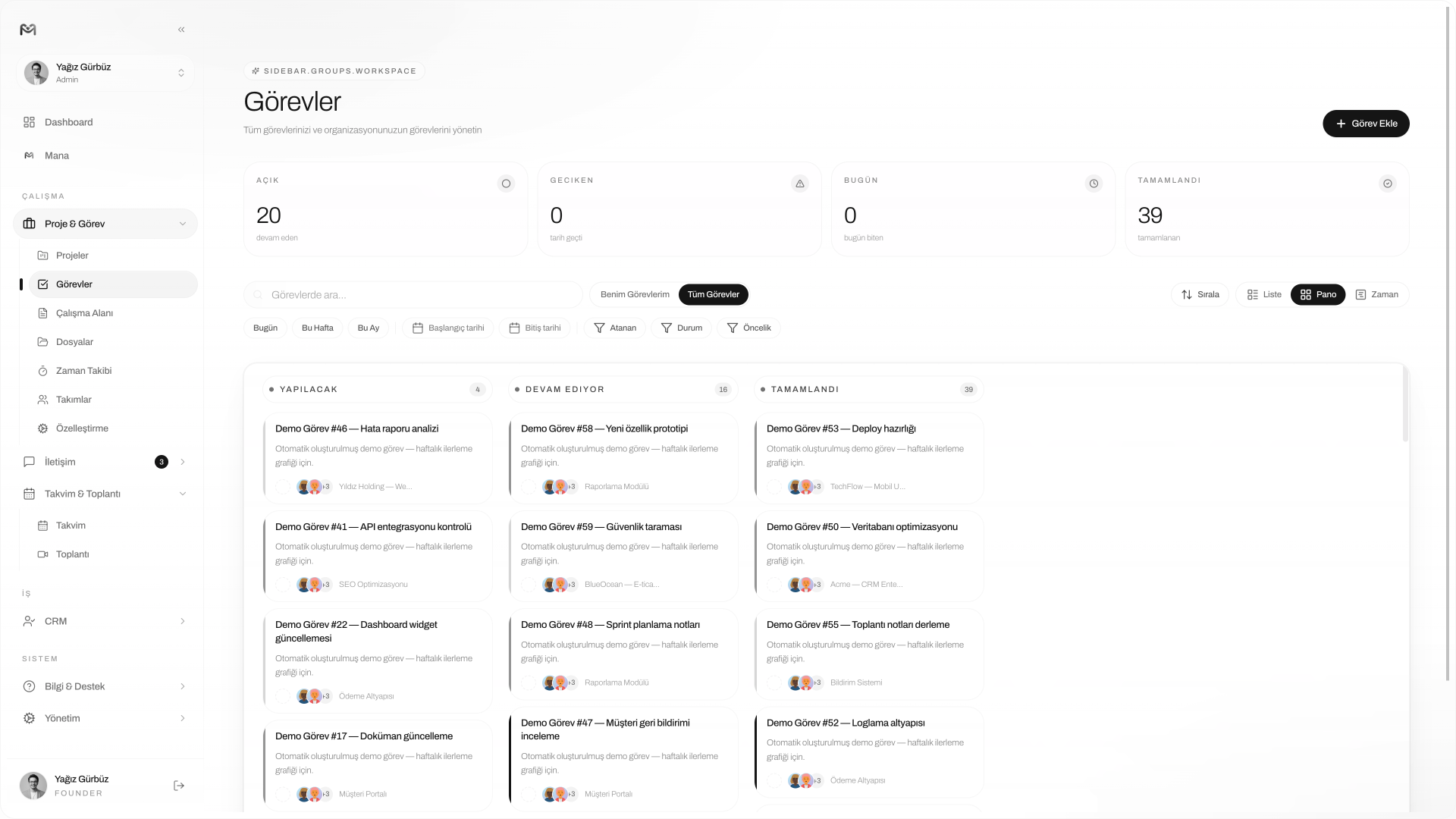
No sign up, no card, no setup. One click opens the real dashboard with projects, tasks, Mana AI and the calendar — exactly as if it were your own account.

Ready? Step inside the system.
No sign-up · No card · Open in 1 second
Most teams manage tasks in WhatsApp messages, the Notes app, Excel and inside their heads. Owners are unclear, statuses are stale, due dates are forgotten. The result: work slips, ownership disperses and delays become the norm.
“Could you also do this?” doesn't become a task.
To-dos stay in the app, never reach the team.
Owner is set, but status is never up-to-date.
Task exists; files and context live elsewhere.
Items waiting for approval get buried in inbox.
Nobody knows where the late task is stuck.
Classic task managers give you another list. Managelify keeps a task with its project, client, files, calendar and communication history. We call this approach Work Relationship Management (WRM).
Open a task in one line — title, assignee, priority, status and due date — and put it into motion. Mana AI can create it by command too.
Assignee, priority (Low/Medium/High) and status (To do/Doing/Done) visible in one glance. The 'who is doing what' question ends.
Drag, filter and group tasks across list, Kanban or timeline. Context never leaves the project, the client or the file.
Catches overdue tasks, turns meeting notes into actions, suggests templates for recurring work. Task management stops being a passive list.
A task isn't just a title. In Managelify a task lives with its subtasks, comments, files, time entries and history. Six tabs, one context.
List, Kanban board and timeline show the same task data from different angles. Whichever way you work, the system follows.
Fast filtering: my tasks, all tasks, by status and priority. Bulk update and sort.
Drag-and-drop across statuses. 'To do → Doing → Done' stays alive in real time.
Daily, weekly and monthly planning. Catch overlapping due dates early.
Weekly reports, monthly invoices, routine checks; set once, the system fires them.
Save frequent work as task templates; speed up filtering with tags.
Assigned to me + this week + high priority. View it daily in one click.
Overdue tasks, upcoming due dates and mentions arrive as real-time notifications.
Mana AI takes task management out of being a passive list. It creates tasks and subtasks by command, spots overdue work, turns meeting notes into actions and suggests priorities based on history. AI is not a feature — it is the production layer of the system.
EXAMPLE COMMAND
"Add a 'Header design' task to the Landing Page project, set priority high, due Friday, assign me."
Freelancer
Turn items from a client brief into tasks in seconds; due date, files and time in one place. Time entries are ready for invoicing.
Agency
Across multiple clients and revision cycles, ownership is clear. See overdue tasks on the board, prioritize with Mana AI.
Startup & team
Manage backlog as a list, sprint as Kanban, planning on the timeline. Turn meeting actions into tasks with one click.
The table below shows the strengths of popular task management tools and what Managelify gathers in a single panel.
Per-task timer and Pomodoro; spent time becomes invoicing and capacity data.
Meeting decisions and ideas link to the related task without getting lost.
Every change on a task — who did what, when. Full transparency.
Task management software is a system that gathers work to be done — title, owner, priority, status and due date — in one digital place. It removes reminder load from your head, clarifies ownership in a team, reduces delays and brings transparency to where work is stuck.
Managelify doesn't see a task as just a to-do. A task lives inside a project, a client, a file, a calendar and a communication flow. List, Kanban and timeline display the same data. Mana AI creates tasks by command, spots overdue work and suggests actions.
List is ideal for detailed filtering and bulk updates. Kanban is for those who want to manage status flow visually with drag-and-drop. Timeline is used to plan due dates daily/weekly/monthly and catch overlaps early. All three operate on the same task data.
Yes. Subtasks can be added under tasks like a checklist; recurring work (weekly reports, monthly invoices) is generated automatically with recurrence settings. You can save frequent work as task templates and reuse them with a single click.
Mana AI creates tasks and subtasks by command, alerts on overdue items, turns meeting notes into actions and suggests priorities/dues based on past data. It is not a chatbot — it is the production layer of task management.
Yes. Time is recorded per task using a live timer or Pomodoro. Records turn into daily, weekly and project-level reports; they feed invoicing for freelancers and capacity planning for agencies.
Yes. You can quickly rebuild your existing tasks, lists and boards in Managelify — and bring the comms, client and file context to the same place to reduce tool sprawl.
Yes. With a single click you can enter the live demo without signing up and explore tasks in list/Kanban/timeline as if it were a real account. No credit card required.
MANAGELIFY
No signup, no credit card, no setup. Open the real task panel in one click; try list, Kanban, timeline and Mana AI as if it were your own account.